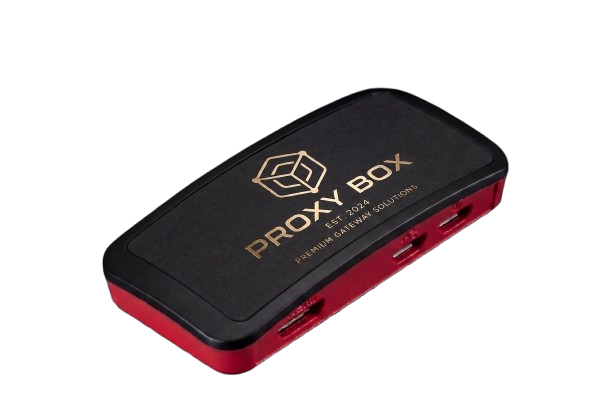
Early access · small-batch hardware

Your home internet. More useful everywhere.

ProxyBox turns the connection you already trust into a private residential proxy—on a little box you own and understand.

Add your own USB drive for HomeVault. Add a spare Wi-Fi radio to share one connection with your gear. Pair a travel box with a Home ProxyBox when you want your home IP on the road.

Standard $59 or Pro $99. US shipping included; current service availability is confirmed separately. Compare models

ProxyBox device

Home route

203.0.113.42

More than a proxy

It starts with your home IP.
Then it keeps earning its spot.

ProxyBox is useful at home, in a travel bag, and anywhere your files or devices need a private way back. Each mode is visible and manageable from the app or web dashboard.

Home base

Your residential IP, ready when you are

Leave ProxyBox behind your router and reach that connection through standard proxy credentials. It connects outward, so there is no port forwarding or router surgery.

From

Phone, laptop, tools

Through

Your ProxyBox

Out as

Your home IP

Private Wi-Fi — Here

One sign-in. Your own little network.

On a compatible dual-radio setup, sign ProxyBox into hotel or guest Wi-Fi once, then connect your laptop, phone, tablet, or streaming stick to the private network it broadcasts.

Your network

Juniper House

4 devices

Use on networks that allow connection sharing. A spare Wi-Fi radio is required.

Private Wi-Fi — My home

Take a network. Leave the exit at home.

Keep one ProxyBox online at home and bring another with you. Devices that join the travel box can route securely through your Home ProxyBox and appear from your home connection.

Home ProxyBox Travel box

My home mode requires two ProxyBoxes and a service entitlement that includes home routing.

HomeVault

Your USB drive becomes a private file home

Attach your own USB drive, then browse, upload, download, rename, and organize files from ProxyBox Connect or the web dashboard. The storage stays on the drive you control.

HomeVault
Family photos42 GB
Projects8 GB
Travel2 GB

USB drive sold separately

The route you control

Choose the traffic. Keep the home identity.

Your Device anywhere in the world ProxyBox plugged in at home Sites & Services see your residential IP

Traffic you send through Proxy Access exits through the ProxyBox at your house. Sites see your own residential connection instead of a rented datacenter or shared proxy pool.

How it works

A guided first setup, then a box designed to reconnect quietly on its own.

1

Give it power

Place your ProxyBox by the router at home or beside your travel gear. It starts a guided setup mode when it needs a network.

2

Connect it your way

Use ProxyBox Connect for Bluetooth-guided onboarding, or join its setup Wi-Fi and finish in a browser. Both paths let you choose the network and claim the box.

3

Choose what it does

Copy the proxy URL, turn on Private Wi-Fi, choose Here or My home, or attach a USB drive for HomeVault. The app and dashboard keep each mode understandable.

Clear control, wherever you are

The powerful parts feel simple

ProxyBox Connect guides setup and keeps Proxy Access, Private Wi-Fi, HomeVault, and box health together. The same essentials are available in the web dashboard.

Guided onboarding

Use Bluetooth in ProxyBox Connect, or fall back to setup Wi-Fi and a browser. The box keeps both paths available when it needs help getting online.

Wi-Fi you can actually manage

Choose Here or My home, give the private network a friendly name, and rotate its password without touching a config file.

9:41

ProxyBox

Dashboard

Network Status

Proxy

Online

Private Wi-Fi

Ready

Proxybox Gold

Online

203.0.113.42

12,341 requests routed

Your new ProxyBox

Online

Uptime 3d 14h

ProxyBox

Add Device

Scanning for nearby devices…

ProxyBox-6W3F

Found

Signal strong · Tap to claim

Claimed. Wi-Fi sent over Bluetooth.

Device

Private Wi-Fi — Here

Status

Online · 3d 14h

Local network

One upstream connection for your gear

Network · Password

Juniper House · cloud-cabin-312

Identify

Pulse the LED to find this box

Pulse

ProxyBox

Proxy

Your residential endpoint

http://pb_a1b2c3:••••@us1.proxybox.us:16102

Copy URL Copied

Paste into Expandi, GoLogin, PhantomBuster, or anything that takes an HTTP proxy. Every request leaves through your home IP.

ProxyBox

Box details

One place for connection, firmware, and hardware status.

ProxyBox-XU3V

Firmware and radios · checked

Connected
Settings

HomeVault in your pocket

Browse folders, upload from Files, preview, download, rename, and organize the USB drive attached to your box.

Status in plain English

See whether a box, its connection, and its useful hardware are ready without translating networking jargon.

ProxyBox Connect provides guided setup and management on iPhone. · Mac and Android are on the roadmap. · Developers can also use the REST API →

Drop-in compatible

Works with the tools you already run.

If a tool accepts a standard HTTP/HTTPS proxy, paste the endpoint from your dashboard. Traffic that tool sends through the proxy exits from your home connection.

Compatibility

Yes, we work with __

__

Don't see your tool? If it accepts an HTTP or HTTPS proxy, ProxyBox works with it. Read the integration docs →

Hardware first. Service separate.

Pick the box that fits your setup.

Buy the hardware once. Service is separate, and current availability is confirmed before activation or any charge.

Best for most people

ProxyBox Standard

Compact and Wi-Fi connected for everyday use at home and away.

$59 one time

US shipping included
  • Built-in Wi-Fi
  • Private proxy, HomeVault, and home routing
  • Add a second Wi-Fi adapter when the box must join and broadcast Wi-Fi at once
See Standard
Wired + flexible

ProxyBox Pro

Built-in Ethernet and Wi-Fi for a steady home, office, or power-user setup.

$99 one time

US shipping included
  • Built-in Ethernet plus Wi-Fi
  • Ideal as a permanent Home ProxyBox
  • Use Ethernet while its Wi-Fi hosts your private network
See Pro

Second Wi-Fi adapter

For hotels, hospitals, offices, coffee shops, and any setup where one box joins Wi-Fi and broadcasts a private network at the same time.

+$20

Early hardware orders are invitation-controlled while units are prepared in small batches. Browsing, requesting an invitation, or buying hardware never silently starts digital service.

Security you can understand

The useful version of security is quiet: private routes, unique credentials, no exposed router ports, and no browsing-history database.

Unique box identity

Each box has its own identity, claim code, and customer-facing proxy credentials.

No inbound ports

The box connects outward, so setup does not require opening your home router to the internet.

Per-device credentials

Each box has its own identity, claim code, and customer-facing proxy credentials.

No browsing-history logs

Health and usage counters help the box work; visited sites and DNS history are not stored.

Wes Lemos

Founder · Solo operation

Why I built this

I was paying hundreds each month for residential proxy access that still felt rented and unpredictable. I wanted something small I could own and understand, using the internet connection already in my house. The proxy grew into Private Wi-Fi, home routing, and HomeVault—because the hardware was already there and could do more.

Early ProxyBoxes are flashed and checked in small batches. If something breaks, I'm the person who sees the ticket. Ideas and field reports go straight to me, not a support maze.

Frequently Asked Questions

A residential proxy sends selected traffic through a home IP address assigned by an ISP rather than through a datacenter address. ProxyBox makes your own home connection available through standard proxy credentials; website rules and your activity still determine what each service allows.
ProxyBox is a small device that connects outward from your network to our relay, so it works without port forwarding. You decide whether to use Proxy Access, Private Wi-Fi — Here, Private Wi-Fi — My home, or HomeVault. Setup works through ProxyBox Connect over Bluetooth or through the box's setup Wi-Fi in a browser.
ProxyBox is a personal networking device and residential proxy on hardware you control. As with any networking tool, you are responsible for lawful use and for following the rules of your ISP, websites, workplace, hotel, or other network you connect to.
A compatible dual-radio ProxyBox joins the venue's Wi-Fi with one radio and broadcasts a private network with the other. Complete a captive-portal approval once, then join your devices to the friendly Wi-Fi name and password you chose. Choose Private Wi-Fi — Here to use the venue connection directly, or Private Wi-Fi — My home to route through another ProxyBox kept online at home. Use connection sharing only where the network permits it.
Your ISP still carries traffic leaving your home connection, just as it does today. HTTPS protects page contents in transit, and optional DNS-over-HTTPS can protect DNS lookups. ProxyBox is not a promise that your ISP can see nothing.
ProxyBox Standard is $59 and ProxyBox Pro is $99, with US shipping included. A second Wi-Fi adapter is an optional $20. Current service availability and any price are confirmed separately before activation. Existing customers keep the terms of plans they already purchased.
HomeVault turns a USB drive attached to your ProxyBox into private storage you can reach from ProxyBox Connect or the web dashboard. You can browse, upload, download, preview, rename, create folders, and organize files while the storage itself stays on your drive at home.
If your home internet drops, remote proxy, Private Wi-Fi — My home, and HomeVault sessions through that box disconnect. ProxyBox is designed to reconnect automatically after service returns, but it has no cellular backup and is not an enterprise high-availability product.
US shipping is included. International availability depends on the destination, customs, and the correct regional power adapter. Tell us your country and we will confirm what is currently possible before you order.
ProxyBox runs on compact Raspberry Pi hardware. Standard uses a supported Wi-Fi-only board; Pro uses a larger supported board with built-in Ethernet. We may use equivalent boards within each tier as availability changes, while keeping the capabilities you ordered. Both are quiet, low-power devices designed to sit by a router or travel in a small tech pouch.

Ready to own your internet?

Choose Standard or Pro and join the early batch. We will guide the first setup and keep listening to what the box needs to become.

Free shipping in the US
Service starts separately
No browsing-history logs

Proven in the lab

Real milestones from building and testing ProxyBox.

Hours online

Firmware builds

Updates installed